
Search Console Removals tool requests can help a verified site owner address a documented, time-sensitive search-result concern. This guide explains the temporary-removal, clear-snippet, request-history, outdated-content, SafeSearch, URL-scope, and lasting-action boundaries set out in Google’s current documentation. It focuses on evidence-led decisions and does not treat a removal request as proof of crawling, canonical selection, indexing, ranking, traffic, or future display.
Start with the observed problem, not a removal button
A removal request is useful only when it answers a narrow, verified problem. Begin with one URL or image result, the exact page state visible now, who controls that page, what has changed, and why a reader or site owner needs a result treated differently. That short fact set prevents a familiar error: using a high-impact Search Console control because a search result feels inconvenient rather than because its live state and intended treatment are understood. Google’s removal guidance separates temporary hides, lasting site-side removal, and outdated-content refresh for good reason. [1]
Write an observation before choosing a tool. For example, “The owner removed a sensitive PDF at this exact path and needs a short-term search-result hide while the server response and related URL variants are verified.” That is different from “A search result looks old,” “a duplicate URL exists,” or “a report shows crawl errors.” Those examples need different evidence and may need a different workflow. A clear opening observation helps the person submitting a request preserve the intended scope, select the correct path, and explain the follow-through to a reviewer.
What the Search Console Removals tool is designed to do
Google describes the Removals tool as a way for owners of a Search Console property to temporarily block pages from Google Search results, view removal-request history, and view URLs reported as adult content. It is not a tool for taking content off the web, removing results from other search engines, or making an enduring decision about every version of a page. A page or image can still exist on the server while a temporary hide is active. [1]
This scope should shape the language in a work ticket. Say that a request seeks a time-limited treatment in Google Search for the selected URL or prefix, not that it deletes a page, prevents every crawl, or resolves an unrelated search-performance question. The practical benefit of this restraint is operational: a temporary request can coexist with a content change, a server response, access control, a URL migration, or a later recheck, but it does not replace any of them.
Do not turn a temporary request into a permanent-removal plan
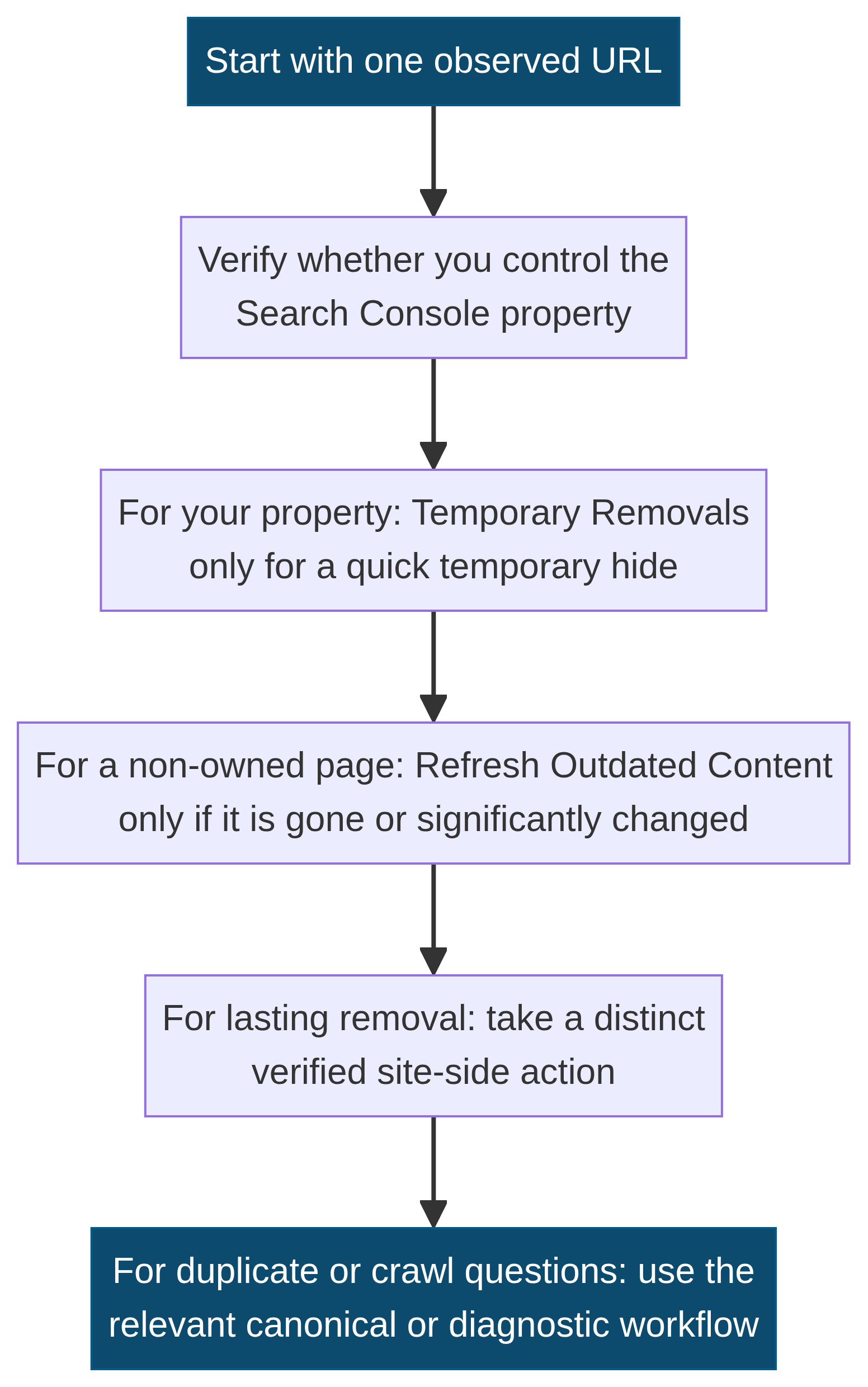
A successful temporary-removal request lasts about six months. Google expressly states that the tool alone is not a lasting removal process. If the page still exists and is accessible when the temporary period ends, it may be eligible to appear again in Google Search. That is why the request should be paired with a documented decision about the page itself whenever the real objective is enduring removal or privacy. [1] [2]
The useful question is not whether six months is “long enough.” It is whether the team has used that period to complete and verify the durable work: remove or revise the content, restrict access, apply an appropriate index-control instruction, or decide that the page should remain publicly available. A short-term request can create time to coordinate a repair. It should not become a substitute for deciding what the URL is meant to do when readers, crawlers, or staff reach it later.
Separate owner-controlled and non-owner situations
Ownership is a first decision point. The Search Console Removals tool applies to a property the requester owns. Google’s Refresh Outdated Content tool is a separate workflow for a person who does not own the page or image and where the content is gone or substantially changed. The difference is not cosmetic: the tools start from different access and live-state conditions. [1] [3]
For an owned property, confirm the exact property and that the URL belongs to it before planning any request. For content on a different site, do not use ownership language or treat a change request as authority over the publisher’s page. First confirm whether the non-owned page or image no longer exists or differs materially from the result being observed. If the information remains live, the outdated-content request is not the matching process. Preserve this distinction in the article, in an incident note, and in any handoff.
Choose the request type only after the page state is clear
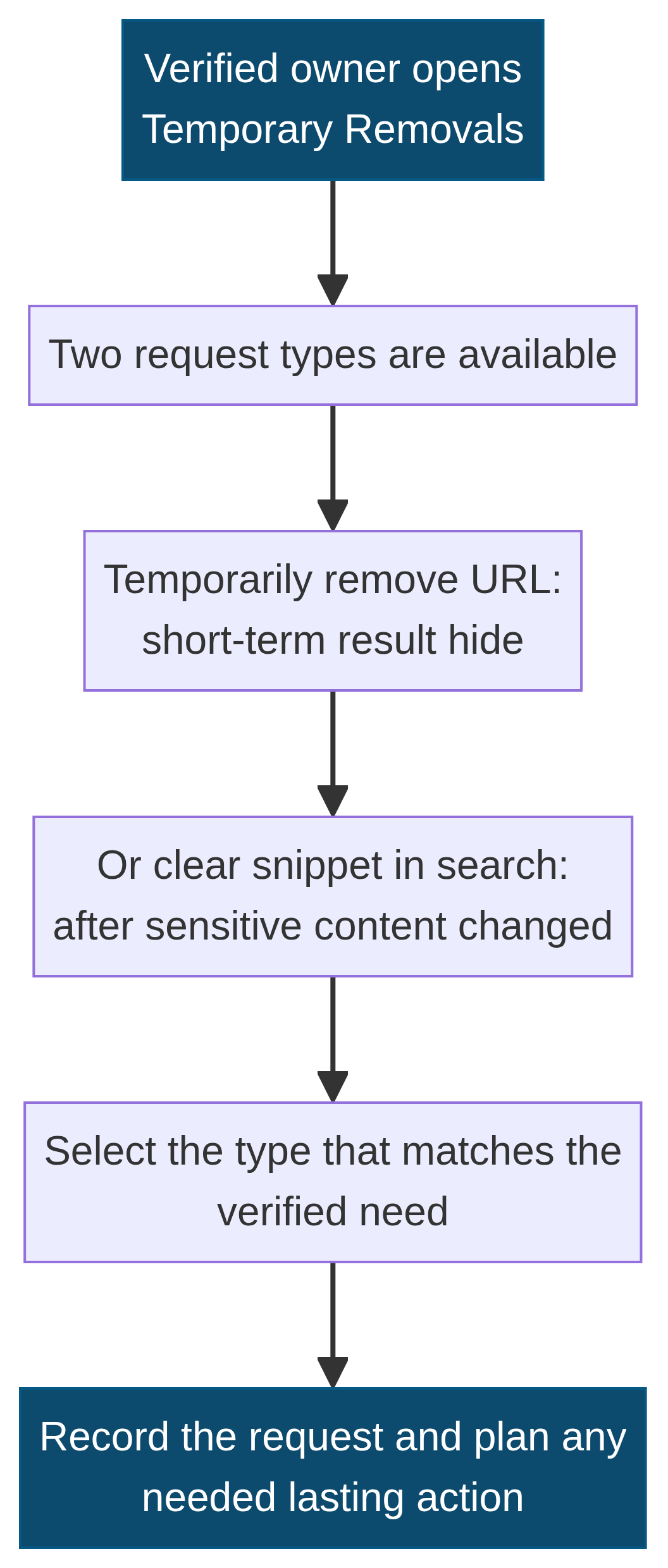
Within Temporary Removals, Google identifies two request types: temporarily remove a URL and clear a snippet in search. The first is for a short-term search-result hide. The second is appropriate after sensitive content has been removed from a page and the objective is to ask Google to clear the result’s cached/snippet presentation while Google processes the updated page. The exact choice matters because the two requests describe different effects and follow-through needs. [1] [4]
Do not submit both merely because a page feels urgent. Capture what remains live at the URL, whether the content itself changed, what result is being observed, and what time-limited or durable action is already planned. If the team cannot state why one type fits better than the other, pause the request and clarify the facts. A pause is safer than using an overly broad request that later obscures what the team intended to change.
Use temporary URL removal for a bounded short-term hide
A temporary URL-removal request is relevant when the owner needs a URL or image taken out of Google Search quickly while a separate response is being completed. Common operational contexts include a confirmed accidental exposure, a page that has been removed but is still encountered in results, or an urgent content change where the team needs a temporary bridge to the lasting page treatment. Google notes that the request usually takes up to a day to process and may be denied. [1]
That wording supports an evidence-led plan rather than a prediction. Record the observed URL, date, exact request type, current page condition, and the lasting action owner. Recheck the request history and the live URL rather than assuming a submission resolves the underlying content issue. This is especially important where the page has alternate paths, asset references, translations, parameter variants, or a linked file that needs its own verification.
Use clear snippet in search for changed sensitive content
Clear snippet in search is not a rewrite tool for ordinary marketing copy, an editorial preference, or a disagreement with how a result reads. Google frames it for a page that has been updated to remove sensitive content, where the owner wants the search-result information to reflect the change. The live page and the changed material are therefore part of the evidence packet. [1]
A practical review starts by checking that the sensitive material is no longer on the publicly reachable page, its visible source, or linked assets. Then record a before-and-after description without putting sensitive content into a broad shared log. If the content must not remain accessible at all, do not stop at a snippet request: select the lasting page action that fits the verified privacy or removal objective. The article’s role is to explain that difference, not to suggest that a snippet request handles every exposure scenario.
Copy the observed URL exactly before setting scope
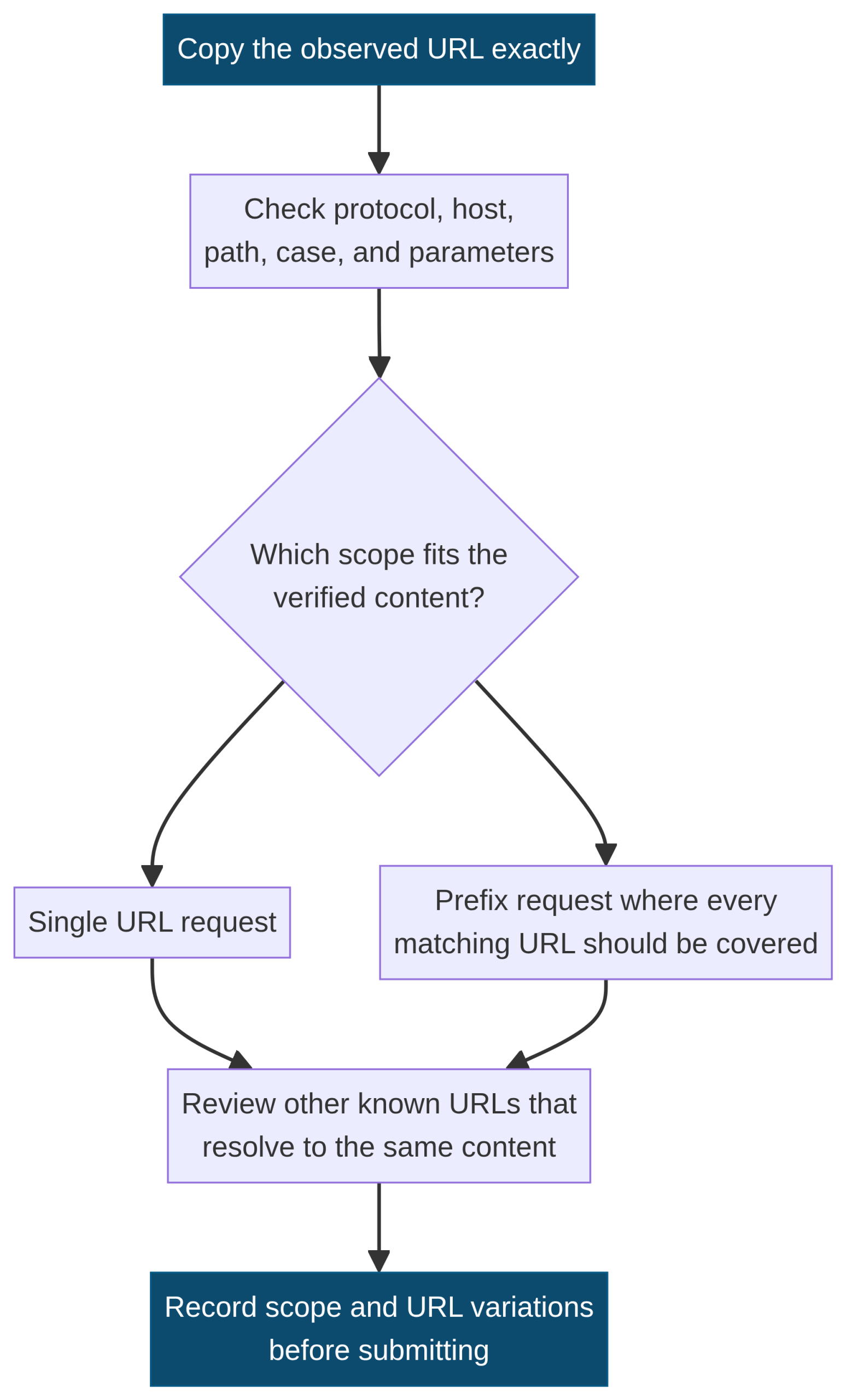
Google cautions owners to account for additional URLs that point to the same page and for URL-casing variations their server handles. Start with the exact result URL: protocol, hostname, path, trailing slash behavior, letter case, query string, and file extension can matter to the evidence record. Do not rewrite the URL into a preferred form before you understand what readers and Google are being shown. [1] [2]
The first check is factual, not speculative. Does the observed URL resolve? Does it redirect? Does it return a page, image, PDF, error response, or access-control response? Do current internal links or a sitemap expose a related address? A one-URL request may be sufficient when the problem is truly one URL. A prefix scope deserves more care because it can cover multiple matching URLs. Document why the chosen scope matches the verified content rather than treating a wider scope as automatically more thorough.
Review URL variants without assuming they are duplicates
A URL variation might be a case variant, a parameterized path, an HTTP/HTTPS version, a hostname difference, a redirected legacy location, or a genuinely distinct resource. Its presence in search results does not by itself tell you which version Google will select as canonical or whether the variation is a technical defect. Record the real public behavior first. The site’s canonical tags and duplicate-pages guide is the relevant contextual resource when the question is consolidation rather than a temporary hide.
The Removals tool is not Google’s recommended method for choosing the “right” duplicate version. Google warns that using URL removal for that purpose can remove more than the preferred version. If the actual question is canonical consolidation, a site move, or a duplicate public path, use the dedicated analysis and implementation workflow. That separation protects a temporary-removal request from becoming an untested replacement for a canonical, redirect, content, or navigation decision. [1]
Plan for the about-six-month temporary period
Temporary hides are easiest to manage when they have an explicit expiry plan. Note the submission date, expected review point, intended lasting action, owner, and evidence required to confirm the page’s eventual public state. Google says a block lasts only about six months, so a team should schedule an earlier review rather than wait for an expiry notice or assume that the issue has disappeared. [1]
The review should revisit the actual page, any known variants, the relevant server response, access setting, or noindex instruction, depending on the original objective. It should also distinguish “the temporary request exists in history” from “the URL has the desired durable state.” A clear record helps prevent the common operational gap where a person remembers submitting a request but no one later checks whether the content, response, or access path was changed as intended.
Remember that a temporary hide does not stop crawling
Google states that temporary blocking changes whether a page shows in its Search results; it does not by itself prevent Google from crawling a URL that still exists and is not blocked by another method. This is a critical limit. A request should not be described as a crawl-control action, a server fix, or a substitute for securing live content. [1]
If the page should be inaccessible, use an access-control or content-removal path that produces the required live behavior. If it should remain public but should not be indexed, review the appropriate noindex implementation. If a crawler was unable to reach the page because of a 404 or server error when the request was filed, Google explains that the request can later expire and a page found at that URL can be treated as new. These are reasons to verify the actual state, not to make a broad conclusion from the removal request alone. [1]
Choose the lasting action that matches a verified objective
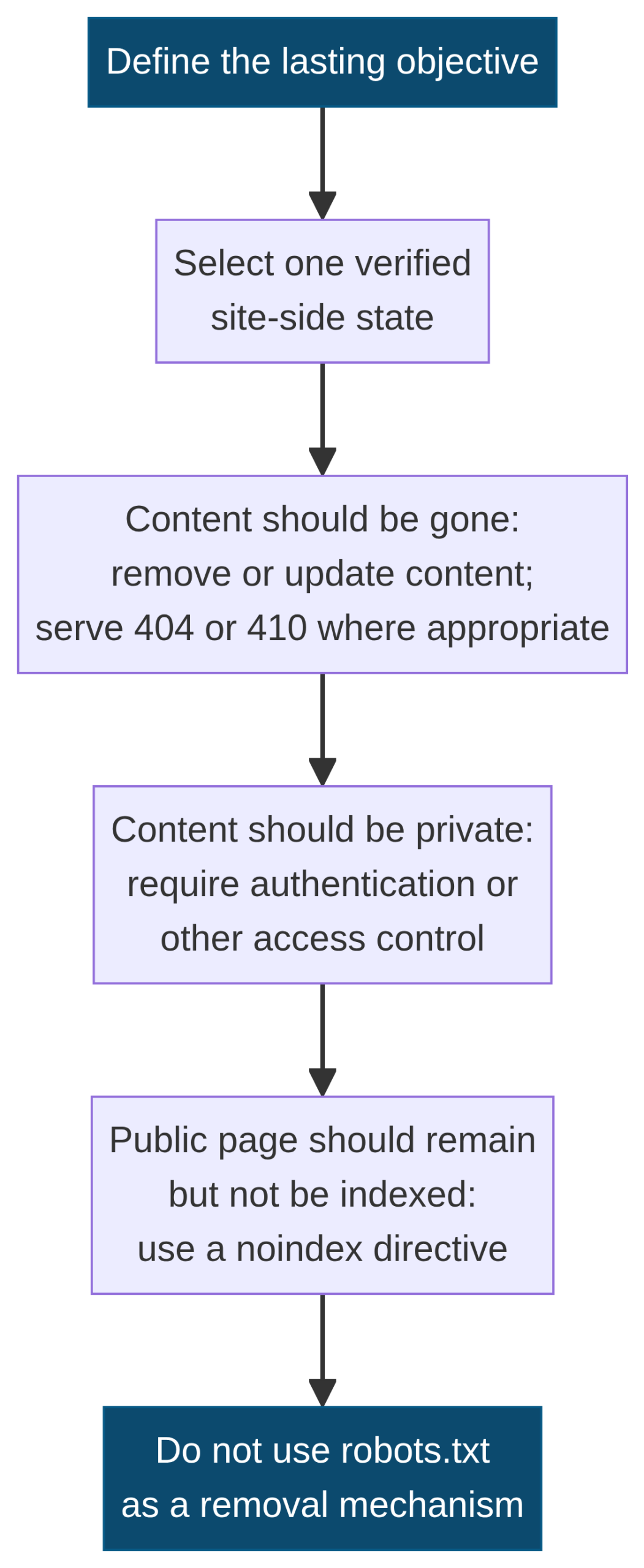
Google’s guidance for a lasting removal is direct: remove or update the content and return an appropriate 404 or 410 where the content is genuinely gone; restrict access when the content should be private; or use a noindex directive when a page should remain publicly accessible but should not be shown in Google Search. Each option makes a different statement about the resource. [1] [2]
There is no universal “best” option because the right action depends on the page’s real purpose. A deleted document should not silently become a generic page. A private client area should not rely on a temporary search-result hide. A public utility page should not be removed solely because it is low priority. Confirm current purpose, linked dependencies, and owner approval before changing a response or access rule. A temporary request can support a time-sensitive sequence, but the durable decision belongs to the page itself.
Do not use robots.txt as a removal mechanism
Google explicitly advises against using robots.txt as a blocking mechanism for lasting removal. A robots rule is not a substitute for removing sensitive content, returning an appropriate status for truly gone material, restricting access, or using an applicable noindex instruction. The difference matters because a blocked crawler may be unable to see the directive or the content state that would support the intended lasting treatment. [1]
This is also why a removal ticket should name its actual objective. If the aim is to manage crawl access to a site section, that is a crawler-management question. If the aim is to remove content from the web, that is a content and server-control question. If the aim is a temporary Google Search-result hide, it belongs in Removals. Combining these into one unqualified “block this URL” instruction creates avoidable risk and obscures what was actually changed.
Avoid using Removals for routine cleanup
Google says the tool is not intended to clean up ordinary old pages that return 404, to remove crawl errors from a Search Console account, to start a site from scratch, or to move a site. Existing indexing and crawl reporting will change as Google processes actual page and site conditions. An urgent-removal request is therefore not a general maintenance shortcut. [1]
For a retired URL, first identify whether an equivalent truthful destination exists, whether a 404 or 410 is the correct live response, and whether internal links or sitemap entries require a bounded update. The XML sitemap governance guide provides contextual guidance for submitted canonical URLs; it does not replace a URL-specific removal decision. Keep redirection, sitemap hygiene, public response, and temporary hides in their own evidence columns.
Handle a changed or gone non-owned page differently
The Refresh Outdated Content tool is relevant where the requester does not own the page or image and it no longer exists or has changed significantly. Google describes it as a way to update information in Google Search, not a way to remove a page from the web. It is not for a page that is still live and unchanged, a basic recrawl request, or a lasting removal request for an accessible public page. [3]
A request can ask for a page or image URL in the required format, and Google may ask for words from an old snippet that are no longer live. For an image, Google says a separate request is required for each page where the image appears. These are tool-specific conditions, so do not write an external-page request as if it were an owner’s Search Console action. Record the observed result URL and live state, then recheck the stated status rather than assuming a request settles every presentation context. [3]
Read request history as evidence, not a verdict
The Removals report provides a history of removal requests over the past six months, including requests from property owners and non-owners. That history can help reconstruct what was requested, by whom, and when. It should not be treated as a complete page-state inventory, a list of every URL Google knows, or proof that all related variants now have the same treatment. [1]
Use a history review to ask specific questions. Is the selected URL the one that was observed? Was the request temporary removal or snippet clearing? Is there a stated denial reason to investigate? Has a later request changed the picture? Which lasting action was recorded? Pair the history with the live URL and, where relevant, server or content-change evidence. A history row is valuable precisely because it adds context to a documentable decision; it is weak evidence when separated from its selected scope and page state.
Treat request statuses and denials as prompts for narrower checking
Google notes that temporary-removal requests usually take up to a day to process and are not assured acceptance; it directs users to check the request status and any available explanation when a request is denied. A denial does not automatically establish that the page should be treated differently; it tells the owner to inspect the request details, URL, scope, and source guidance. [1]
The Refresh Outdated Content tool publishes a more detailed status vocabulary: pending, approved, denied, expired, and cancelled. Those terms belong to that distinct tool and should not be casually copied onto a temporary-removal request record without verifying the relevant interface. In either workflow, a status records the request process. The live page, the continued presence or removal of sensitive material, the URL variants, and the lasting action still need their own evidence. [3]
Cancel a temporary request only with a documented reason
Google provides a cancellation path through the request-history table. Cancellation can be appropriate where a request was scoped incorrectly, the page was restored intentionally, or a different verified treatment was chosen. Before cancelling, preserve the request details and the reason for the change so a later reviewer does not mistake a cancelled request for an unresolved or ignored issue. [1]
The follow-up remains URL-specific. Recheck the live resource, its access state, and the decision record. Where a temporary block was used before completing a lasting removal action, Google advises unblocking and reblocking after the lasting action so the page can be cleared if it was recrawled after blocking. That instruction belongs to the documented lasting-removal sequence; do not apply it mechanically to unrelated pages or without confirming that the original objective still applies. [1]
Understand what the SafeSearch Filtering tab records
The SafeSearch Filtering tab is not a control for owners to label their own ordinary pages. Google explains that users can report particular URLs as adult content through the SafeSearch suggestion tool. Google reviews submissions and may tag a URL as adult content when it determines filtering is appropriate. Search Console then shows the report history for URLs on the property that were reported. [1] [4]
The documented statuses include processing request, request cancelled, request denied, and filtered. A filtered status means the URL is not shown in Google Search to users with SafeSearch turned on. The report should be read as a status/history source, not as a general quality assessment of the site. If the site is believed to be incorrectly categorized, Google provides a review path after the owner has followed its published optimization guidance for the stated period. Preserve the exact URL and status when escalating a verified issue. [1]
Keep privacy, safety, and technical claims in separate records
Removal tasks often mix different concerns: a sensitive-data exposure, a deleted asset, a broken legacy link, a duplicate page, a security incident, or an adult-content report. Combining all of them under “remove from Google” produces vague action requests. Separate the observed live state, privacy or safety concern, intended temporary treatment, lasting action, and validation source. This supports safer review and reduces the chance that an operational request is mistaken for a broad search-visibility diagnosis.
For suspected hacked content, Google cautions against blocking an entire site or URLs that are expected to remain available later. The first work is to clean up the compromise, establish the correct enduring page treatment, and then use the removal tool narrowly where relevant. A document should therefore say what is known, what is still being investigated, and who owns the site-side correction. It should not state that a request proves a security, canonical, crawl, indexing, ranking, or traffic result. [1]
Keep temporary removal distinct from indexing and canonical diagnosis
A temporary hide should never replace a URL-level indexing review. Search Console’s page-indexing reports and URL Inspection serve different questions: they provide information about how Google has categorized or examined an individual URL. The site’s Search Console indexing triage guide is the appropriate contextual resource when the observed issue is an index-status category or a URL-inspection finding.
Similarly, a duplicate-version question needs canonical and public-response evidence rather than a removal request. Google specifically warns that removing an unwanted duplicate URL does not preserve a preferred version and can remove more versions than intended. State the diagnostic question first: “Which URL resolves publicly, which version is canonicalized, and what implementation creates the duplicate path?” Then choose the smallest direct correction. The removal tool can be relevant only to a separate temporary need supported by the page facts. [1]
Build a small evidence record before and after a request
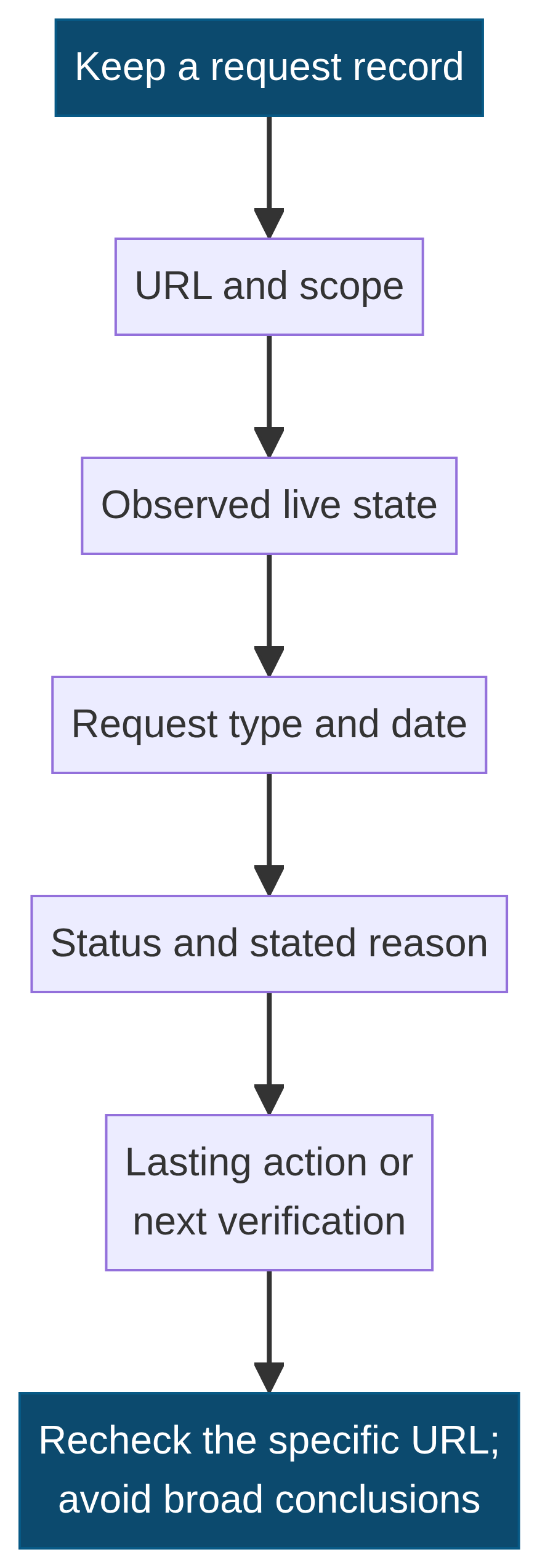
A concise record makes temporary work reversible and reviewable. Include the exact URL, selected scope, observed live state, property ownership confirmation, request type, submission date, current status, stated denial reason if any, the associated lasting action, responsible owner, and next recheck. Record sensitive details only in the appropriate restricted system. The purpose is not paperwork for its own sake; it is to preserve why a high-impact control was used.
The record should also include a limits line: “This request is not evidence of a lasting removal, crawl block, canonical selection, index inclusion, ranking, traffic, or display outcome.” That sentence helps subsequent reviewers avoid extrapolating beyond the source. A specific note can say, for example, that an owner verified a removed PDF returns the intended response and that variants are being checked separately. It should not claim a general change for every search engine, every URL version, or every user context.
Use a proportionate post-request recheck
A good recheck is proportional to the original problem. For a single removed asset, inspect the exact live URL, known variants, relevant internal links, and the request history. For a prefix request, recheck representative URLs and confirm that the scope was justified. For changed sensitive content, confirm that the material is absent from the page and relevant linked resources. For non-owned outdated content, compare the live page with the observed result and read the request status in the appropriate tool.
Avoid turning a recheck into a broad cache purge, large redirect exercise, or speculative configuration change. The aim is to validate the particular page-state decision and document unresolved facts. If a real technical defect appears during that narrow work, open a separate diagnostic task with its own public-response, content, canonical, or infrastructure evidence. This keeps the removal workflow useful without making it a catch-all for every SEO, site-management, or reputation concern.
A pre-submission checklist for safe decisions
Before submitting, confirm that the requester controls the Search Console property when using Temporary Removals; the exact observed URL and its public state are recorded; the request type matches the verified need; the scope is no broader than justified; important variants have been considered; and a lasting action exists if the objective is enduring removal. Confirm separately that the issue is not actually a canonical, site-move, crawl-error, or ordinary old-URL maintenance question. [1] [2]
After submitting, retain the status and date, preserve any explanation for a denial, perform the documented site-side action, and schedule a URL-specific recheck before the temporary period expires. For a non-owned changed or gone page, use the Refresh Outdated Content criteria rather than an owner-control workflow. These checks do not promise a result. They provide a defensible process for matching a documented condition to the narrow tool Google describes.
Final perspective
The Search Console Removals tool is strongest when it is treated as a bounded operational control: it can support a quick, temporary search-result hide for a verified owner property, show request history, and provide SafeSearch-filtering history. It is not a permanent content-removal mechanism, a crawl block, a canonical selector, a general cleanup shortcut, or a search-outcome control. Google’s own documentation makes those boundaries explicit. [1] [2]
Start with an observed URL and live state, confirm ownership, select the narrowest appropriate workflow, record the request, complete any lasting site-side action, and recheck the specific evidence. That sequence keeps an urgent request from becoming an undocumented substitute for content governance, privacy handling, migration planning, or technical diagnosis. It gives a site team a clear process while preserving the difference between a documented action and a future search outcome.