
Google Search Console platform properties give eligible social and video accounts a Search-facing reporting boundary. This guide explains setup, ownership, Performance and Insights reports, query groups, the 24-hour filter, page filters, comparisons, exports and annotations while keeping reported measurements separate from editorial hypotheses and Google’s later presentation decisions.
Use the guide as a review method, not as a ranking promise. The current product boundaries and supported accounts should always be checked against Google’s documentation and the live interface. [1][2]
What platform properties are for
Google Search Console platform properties extend the familiar Search Console reporting model to supported social and video accounts. They give an owner a place to inspect how eligible content is reported in Google Search, rather than asking the owner to infer everything from a website property. The useful mental model is simple: a platform property is a reporting boundary for a supported account, while a website property is a reporting boundary for a URL-prefix or domain property. Neither boundary is a ranking switch.
This distinction matters when a team publishes the same idea in several places. A website page, a YouTube video, an Instagram post, a TikTok video and an X post can have different identifiers, audiences, publication dates and platform analytics. Search Console can expose a Search-facing view for supported platform content, but it does not replace those platforms’ own dashboards. The responsible editorial question is therefore not “which platform won?” but “what was reported, for which property, over which interval, and what decision does that evidence support?”
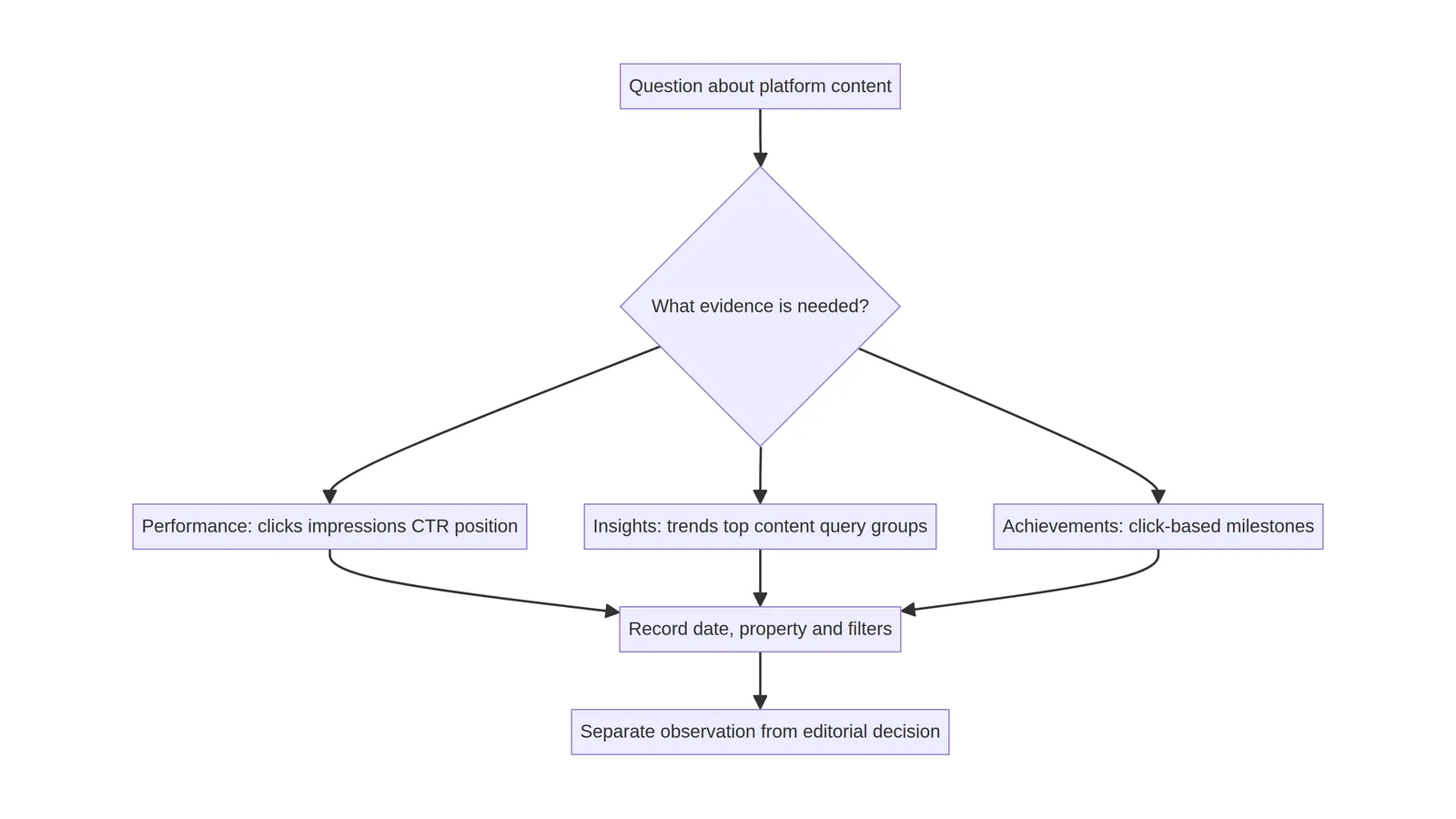
The reports are most useful when they reduce uncertainty. They can help an editor check whether a newly published format is represented, compare query or page groupings, investigate a short recent interval, and preserve an evidence record for later review. They cannot establish that a caption caused an impression, that a format caused a position change, or that a particular cross-promotion will be repeated by Google. Those are hypotheses that require careful observation and should remain labelled as such.
The difference between website and platform properties
A website property is anchored to a domain or URL scope. Its inspection questions usually include crawlability, canonical selection, indexing state, page experience and the performance of website URLs. A platform property is anchored to a supported social or video account and is intended for the Search performance of content associated with that account. The two may be related editorially, but they are not interchangeable datasets.
Keep the boundaries visible in reports. A website property may contain a landing page that links to a video; the platform property may contain the video itself. A website click and a video result impression are not the same event. A page filter in the website property cannot automatically answer how a social post performed on its native platform, and a platform-property report cannot prove that a linked service page converted a visitor.
For a small team, use a two-column evidence ledger: record the property type and exact scope on every export. Include the account or domain tested, owner, date range, search type or report, filters and export filename. This prevents a later reader from combining numbers that look comparable but were produced by different reporting boundaries.
Who should create a property
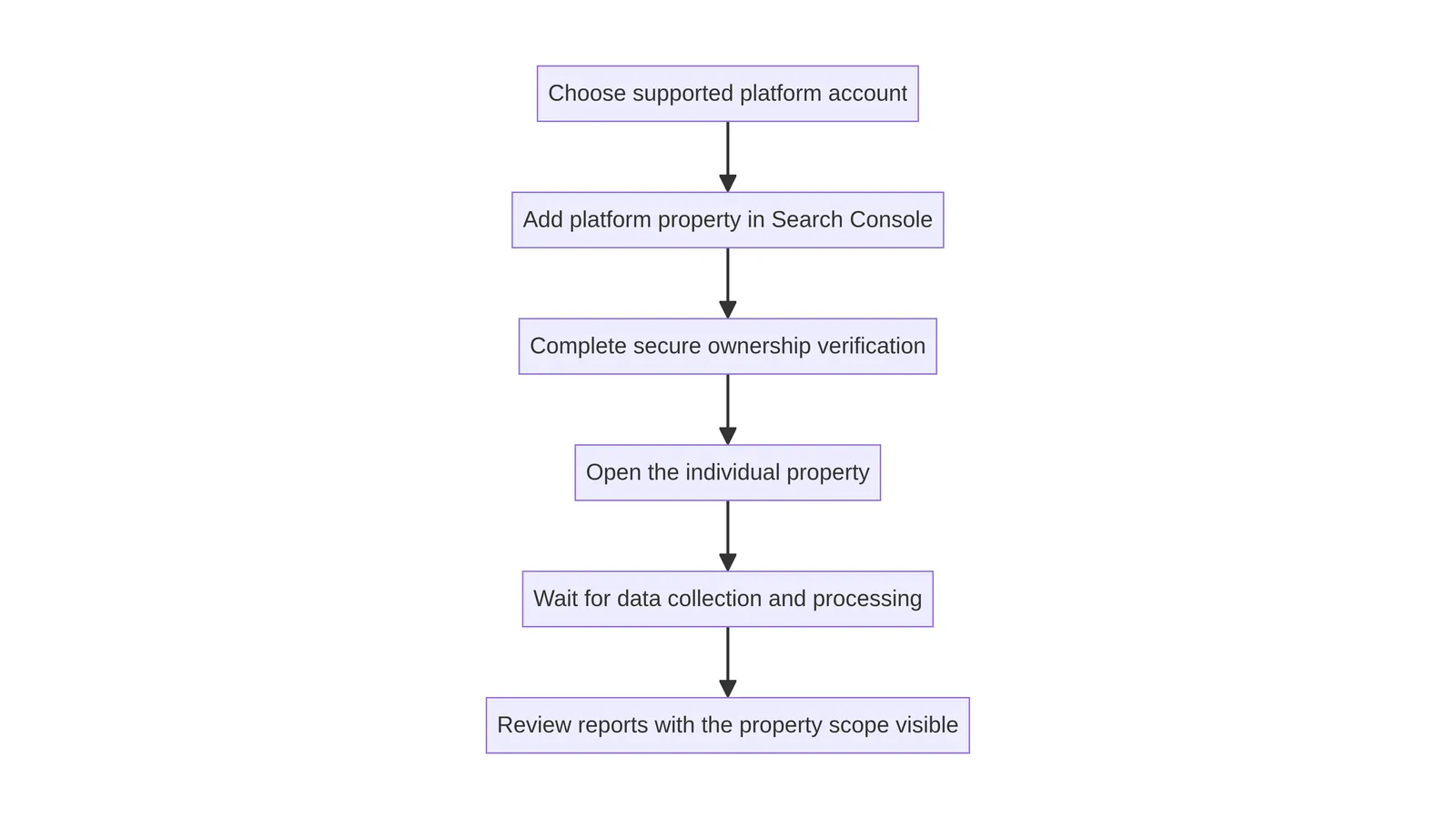
Create a platform property only for an account the organization is authorized to manage. Google’s documentation describes supported account types and ownership or verification steps; those steps should be followed from the current Search Console interface rather than copied from an old screenshot. The person performing setup should document which account was selected, which verification method was used, and whether the property is still visible after a fresh session.
Ownership is an operational control, not an editorial credential. A contractor may prepare a report without being the long-term owner, while an internal administrator may retain ownership and grant appropriate access. Review access when a team member leaves, an agency relationship ends, or a channel changes hands. Do not place passwords, recovery codes or private tokens in the article’s evidence record.
A setup record should also distinguish “property created” from “data available.” A newly created property may need time before reports populate, and delayed or partial data should be recorded rather than silently filled with assumptions. If the account cannot be verified, stop at diagnosis. Do not workaround ownership or present an unverified account as an official property.
Supported account boundaries
The current Google guidance for platform properties identifies supported social and video account types, including Instagram, TikTok, X and YouTube. Support is a product condition that can change, so the source documentation and the live interface are the evidence for a current setup. Do not generalize from one account to every account, country, language or content type.
A supported account is not the same as every post being represented in every report. Content can differ by visibility, format, association, timing and the report’s own processing. Treat the account as the property boundary and the individual item as a reported content entity whose appearance must be checked. If an expected item is absent, record the exact URL or native identifier and the date tested before opening a technical investigation.
Account naming also deserves care. Use the visible handle, canonical profile URL and internal owner name in the ledger, but avoid publishing private contact details. If a brand has several regional or product accounts, keep them separate until the evidence supports a combined view. Combining properties for convenience can make a chart easier to read while making its interpretation less reliable.
Performance report: start with the question
The Performance report is most useful when the question is written before the filter is applied. A report request should state the property, date interval, search type or surface, dimensions, metrics and comparison. “How did this account perform?” is too broad. “Which queries were reported for the account during the first seven complete days after publication?” is testable, provided the report exposes the relevant dimension and the data has matured enough to interpret.
Clicks, impressions, click-through rate and position are measurements with distinct meanings. An impression is not a visit, a click is not a conversion, and an average position is not a promise about where every user saw a result. Platform content can be surfaced in different result contexts, so preserve the selected report type and filters with the export.
Use the report to describe what Search Console recorded. Use platform-native analytics to answer questions about watch time, saves, comments, completion or audience retention when those metrics are provided there. The datasets may inform one another, but they should not be relabelled as one combined funnel without a documented method.
Insights, achievements and product surfaces
Insights and Achievements are useful for orientation and workflow prompts, but they should not be treated as independent proof of causality. An insight can help an editor notice a change or a content group worth investigating. An achievement can mark a product milestone or completed task. Neither one explains every factor behind a Search result, and neither one turns a recommendation into a certain outcome.
When a team records an insight, capture the wording exactly, the property, the date viewed and the report link or filter used to investigate it. Then write a separate interpretation that distinguishes observation from hypothesis. For example, “the report showed more impressions for the selected group” is an observation; “the new caption caused the increase” is a hypothesis that the report alone does not establish.
Avoid copying celebratory product language into an SEO promise. A milestone can be a useful internal checkpoint, while the public article should explain the measurement boundary. This keeps the guide helpful for practitioners who need a repeatable review without implying that using a feature earns a particular Search presentation.
Query groups and query interpretation
Query groups can make a large report easier to review by collecting related terms under a declared rule. The rule is part of the evidence. Record whether the group was based on a literal phrase, a regular expression, a label, a manually reviewed list or a product-defined grouping. Two exports with the same group name are not comparable if the inclusion rule changed.
Start with a small, readable taxonomy. A video publisher might separate brand queries, topic queries, named-series queries and ambiguous queries. A social team might add a format or campaign label only when the query evidence supports it. Keep the taxonomy stable long enough to compare complete intervals, and version it when terms are added or removed.
Do not treat a query group as a demand forecast. A group describes the rows included in a report; it does not measure every person who might have searched. Report zeroes and missing rows carefully, because filtering and privacy thresholds can affect what is displayed. Keep a raw export alongside the interpreted table so another reviewer can reproduce the grouping.
The 24-hour filter and fresh data
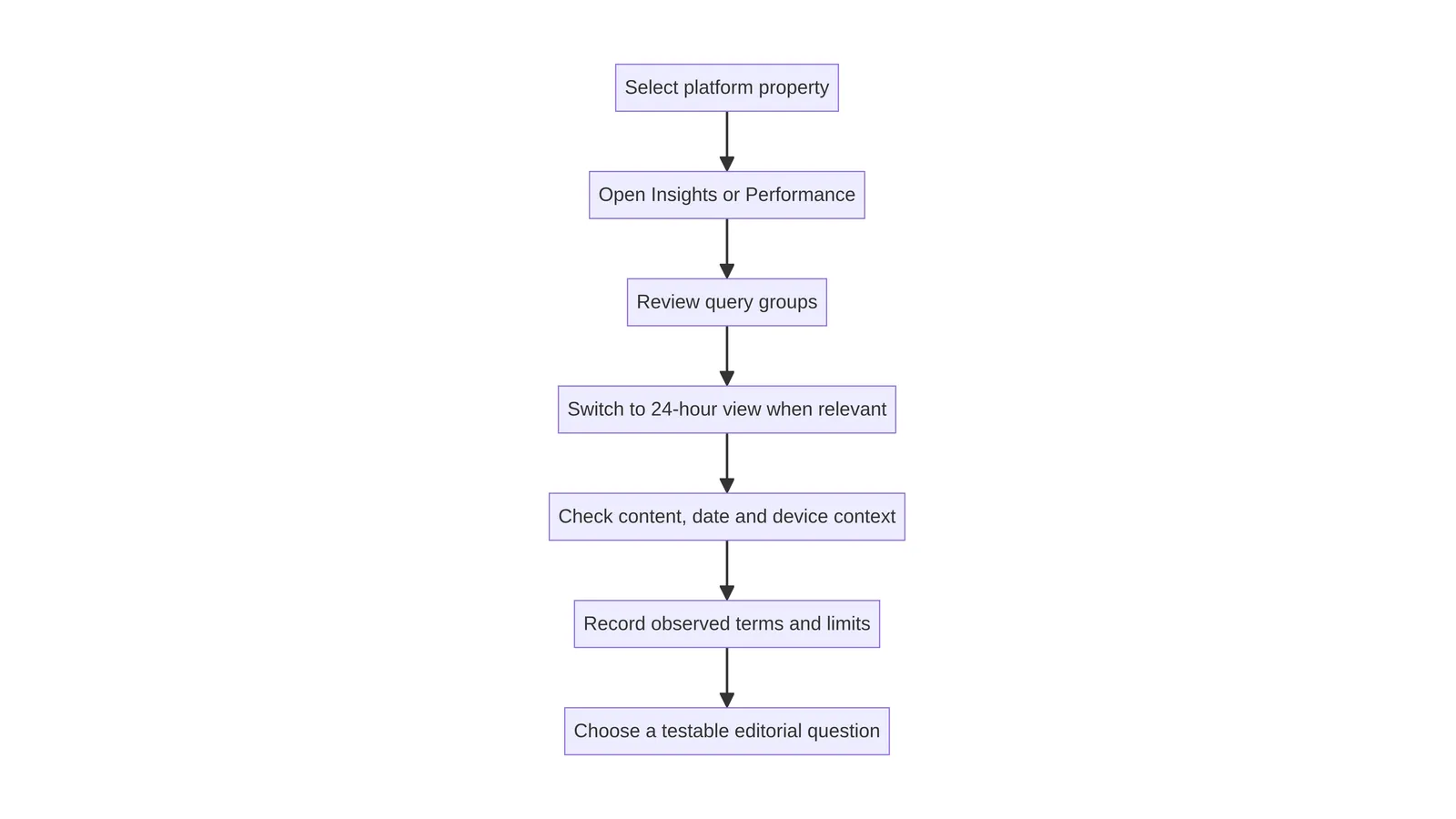
A 24-hour filter is valuable for a recent pulse, especially when an editor needs to check whether newly published content is appearing in a report. Recent data is also the easiest place to overinterpret. Processing can be delayed, rows can be revised, and a short interval can be dominated by a small number of searches. Record the timezone, the exact start and end boundaries, the retrieval time and whether the interval was complete.
Use the short view as a monitoring signal, not as a verdict. A practical workflow compares the 24-hour view with a longer matched interval, then waits for the report to mature before making a durable editorial change. If the latest day is incomplete, label it incomplete. If the query list changes after processing, preserve both exports and note the refresh date.
The right response to a quiet first day is not to rewrite every title or caption. Check whether the content is accessible, whether the property and filters are correct, and whether the observation window is long enough for the decision. The filter can accelerate inspection while still requiring restraint.
Page filters and URL scope
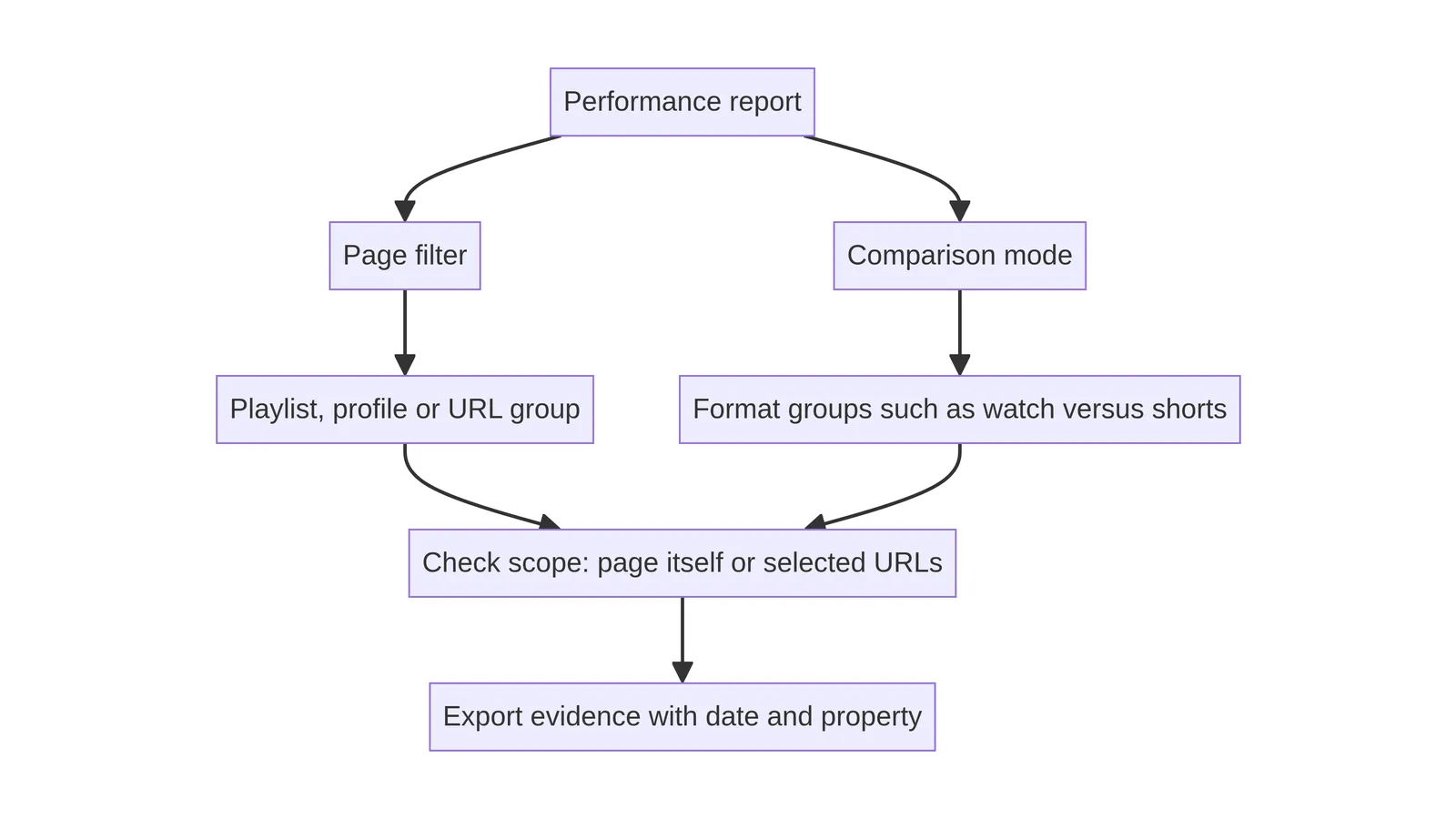
Page filters are especially important when a platform account links to many pieces of content or when a report exposes associated URLs. Use exact URL filters when the question concerns one canonical page. Use a narrow prefix only when the folder or path has a clear editorial meaning. Record whether the filter includes protocol, hostname, trailing slash and query-string variants.
A URL filter is not a substitute for canonical validation. Before interpreting a page row, open the public URL and check status, canonical, robots directive and visible title. If several URLs represent one item, document the relationship instead of adding them together casually. A report may list a URL variant while the public page redirects or declares another canonical.
When platform content points to a website, keep the page and platform identifiers in separate columns. This lets the team ask whether both were reported without implying that a page click came from a particular post unless a reliable attribution system supports that conclusion.
Comparison mode without false precision
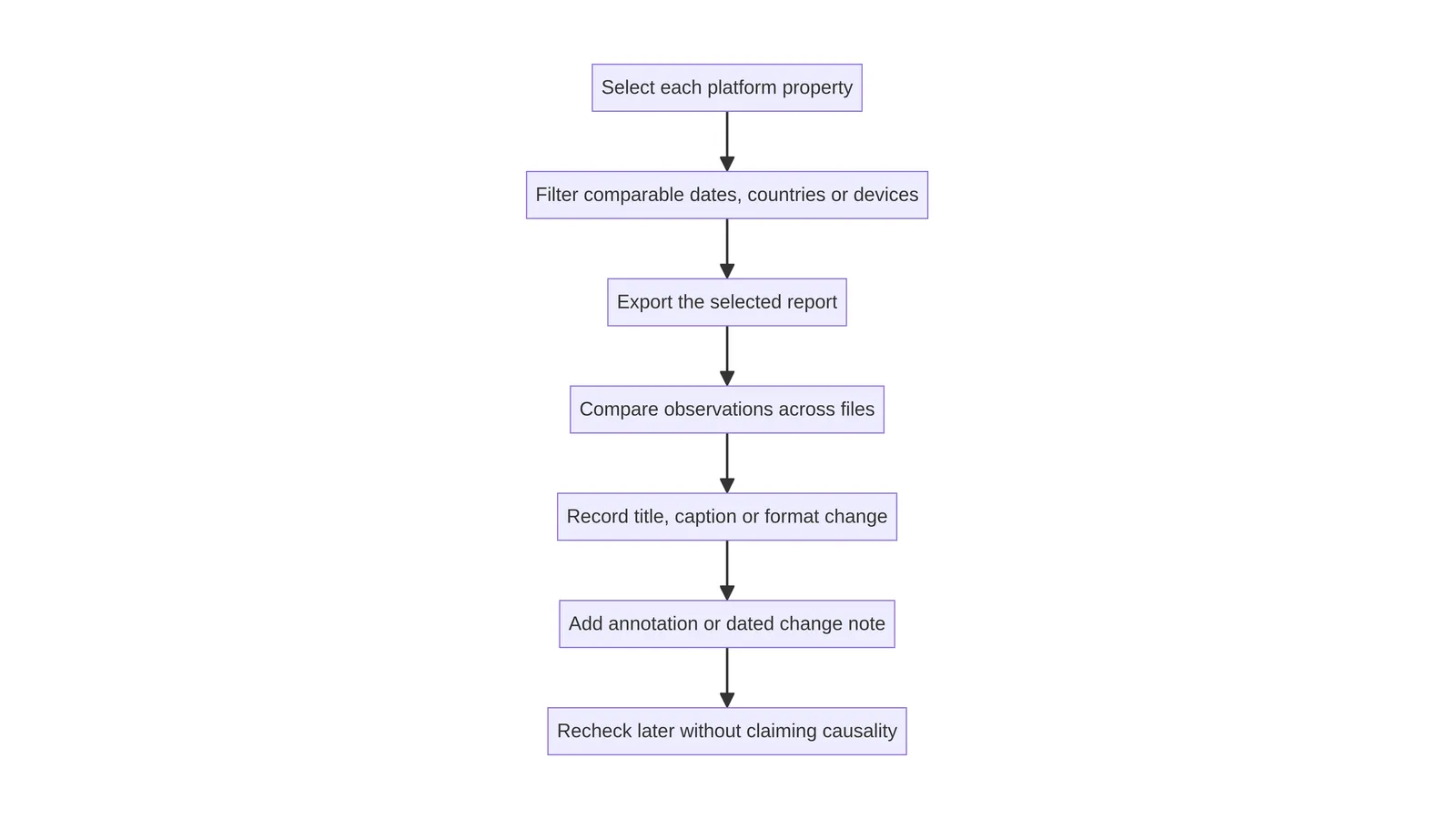
Comparison mode can expose differences between countries, devices, date ranges, search appearances or content groups. Choose one comparison that answers the editorial question. Too many simultaneous comparisons produce a colourful table that nobody can explain. Keep the primary dimension, metric and interval visible in the report title.
Compare like with like. A seven-day interval against a 28-day interval needs a clear reason, and a device comparison should not be read as a total-audience comparison. Differences can reflect audience mix, query mix, Search surface, processing, seasonality or the number of rows exposed. They are signals for investigation, not isolated explanations.
For decision records, include the baseline, comparison, metric, direction and uncertainty note. “Mobile impressions were higher than desktop in the selected interval” is precise. “Mobile content performed better because it was optimized” goes beyond the evidence unless the team has a controlled design and an appropriate measurement plan.
Exports: make the evidence portable
Exports are useful when the review must be shared, audited or revisited after the interface changes. Name each file with the property, report, interval, filter version and retrieval date. Keep the raw export unchanged and create a separate working copy for labels or calculations. If an export is redacted, say what was removed and why.
A good evidence package includes the raw file, a short readme, the filter definitions, a screenshot or link to the report state when permitted, and the decision note. Do not store credentials, private account tokens or unnecessary personal data. If a native platform export contains additional audience information, keep it in the platform’s approved workspace and cite only the aggregate fact needed for the editorial decision.
Reproducibility is more important than decoration. A future reviewer should be able to identify the property, interval and filter without opening a spreadsheet full of unexplained tabs. The export is a record of what the tool returned at a point in time, not a permanent statement about future Search behaviour.
Annotations and editorial changes
Annotations connect a reported change with a documented editorial event, such as a publication, format revision, redirect repair or measurement correction. They do not prove that the event caused the chart movement. Use an annotation to mark the event, then write a separate analysis that accounts for the interval, comparison group, data delay and other plausible explanations.
Keep annotations factual and short. A useful entry names the URL or platform item, change type, owner, deployed date, validation status and relevant ticket. “Updated opening paragraph and repaired canonical on 2026-08-26” is more useful than “SEO improved.” If a title or caption was changed, preserve the before-and-after text in the editorial system rather than hiding the change behind a performance claim.
Review annotations at the same cadence as the report. Remove ambiguity by adding a correction note when an earlier date was wrong. This creates a chain of custody for editorial decisions while respecting the fact that Google’s later presentation and processing decisions remain outside the publisher’s control.
Cross-platform comparison workflow
Cross-platform work is strongest when each platform first receives its own truthful review. Start with the native account identifier, native analytics and publication context. Then inspect the corresponding Search Console platform property, if supported, using the same calendar convention and a clearly stated question. Only after both records are complete should the team create a cross-platform comparison.
Use a normalized evidence table with columns for platform, item identifier, publication date, format, Search Console interval, reported impressions, clicks, average position where available, native metric name and caveats. Do not fill unavailable metrics with zero. “Not reported” and “zero reported” are different states. If timezones differ, preserve the source timezone and add a UTC review field rather than silently shifting dates.
A comparison can guide the next review question. It cannot rank platforms universally or establish that a particular format will repeat its observed pattern. Keep the editorial action small: verify one item, improve one explanation, test one accessible link, or schedule one later review.
Ownership rechecks and delayed data
Ownership should be rechecked after account migrations, permission changes, domain changes or a long gap between reviews. A property that was visible to one user may not be visible to another. Record the account role and the date of the check without publishing personal access details.
Delayed data is a normal interpretation constraint. The latest interval may be incomplete, while older rows can be revised or grouped differently after processing. If a report looks materially different on a second visit, preserve the timestamps and compare the filters before concluding that content changed. A report refresh is evidence about the reporting system, not proof that the underlying audience behaved in exactly the same way as the chart suggests.
For handoff, use three labels: observed, pending and not available. Observed means the row was returned under the recorded filter. Pending means the interval or property needs another check. Not available means the report did not expose the requested dimension or item. These labels are clearer than forcing every question into a yes-or-no answer.
Failure diagnosis: when content is missing
When an expected platform item is missing, begin with scope and identity. Confirm the exact account, native URL or identifier, ownership state, visibility and publication date. Then confirm the report, date range, search type, query or page filter and export timestamp. Many apparent failures are scope mistakes or premature checks.
Next, inspect the public destination and its relationship to the platform item. A link can be redirected, removed, blocked by access controls or replaced by a canonical page. A video can have a visibility state or format that differs from the assumed one. Do not infer the cause from one empty chart. Write the observed state, test a nearby known item if appropriate, and consult the current Google documentation for product-specific limits.
Escalate only with a reproducible record. Include the property type, account scope, exact item, filters, timestamps, screenshots where allowed and the expected-versus-observed result. Avoid changing several titles, captions, URLs and tracking parameters while diagnosing one missing row; that destroys the ability to learn from the next observation.
A practical evidence record
The following compact record is enough for most editorial reviews. It keeps the report state reproducible without turning a content note into a private analytics warehouse. Store the raw export in the approved location and link to its internal path rather than embedding sensitive data in a public article.
Maintenance handoff
Assign one owner for property access, one reviewer for interpretation and one editorial owner for changes. These roles can be held by one person on a small team, but naming the responsibilities prevents a report from becoming orphaned. Review the supported account list and Google documentation when the product interface changes or when a new platform is proposed.
A maintenance handoff should state the next review date, the expected data maturity, the current filter version, unresolved questions and the rollback or correction path for any editorial change. Keep the website property and each platform property in a shared inventory, but do not collapse them into one score. A clear inventory is more durable than a dashboard screenshot because it preserves the boundaries that make interpretation possible.
If the team changes a title, description, thumbnail, caption, format or link, record the factual change and its deployment date. Later Search Console observations can be reviewed beside the annotation, while the final interpretation remains cautious. This is a professional standard: use the tool to learn, not to promise an outcome.
What this workflow cannot tell you
Search Console platform properties can tell you what the supported report returned for a selected account, interval and filter. They cannot tell you every reason a result was shown, whether a user noticed it, whether a native-platform action caused a Search event, or whether the same pattern will recur. Platform analytics can answer different questions, but they also have their own definitions and processing rules.
The workflow does not promise rankings, clicks, indexing, Discover or News inclusion, AI presentation, platform growth, audience growth or a particular search appearance. It cannot convert correlation into causation by adding an annotation. It cannot replace accessible publishing, clear page identity, truthful structured data, a useful canonical URL or a careful editorial process.
That boundary is practical rather than pessimistic. When the evidence is narrow, the decision can be narrow. When the evidence is delayed, the next step can be a later review. When a property is unsupported, the team can preserve native analytics and avoid inventing a Search Console interpretation. Good measurement makes uncertainty visible instead of hiding it.
Setup and review checklist
Before closing a review, confirm the property scope, owner, supported account type, report, interval, timezone, filters, export name, data-maturity note and interpretation boundary. Confirm that every platform item is identified by its native URL or identifier and that any associated website URL has been checked separately for status, canonical and robots output.
Then record the decision in one sentence. Examples include: “Keep the current title and revisit after the interval is complete,” “Repair the canonical and annotate the deployment,” or “Do not compare native watch time with Search clicks in the same table.” A decision that can be repeated is more valuable than a high score that cannot be explained.
The checklist below is deliberately conservative. It supports a real editorial handoff while avoiding claims about a future Google result.
Property review record
| Field | Record | Why it matters |
|---|---|---|
| Property boundary | Website domain/URL scope or supported platform account | Prevents unlike datasets being combined. |
| Report state | Report, search type, dimensions and filters | Makes the observation reproducible. |
| Time state | Start, end, timezone, retrieval time and maturity | Separates complete intervals from fresh or delayed data. |
| Interpretation | Observed fact, hypothesis and next check | Stops correlation being written as causality. |
- Record the exact property type and account or URL scope.
- Confirm authorized ownership and the current verification state.
- Write the question before applying a report filter.
- Save interval, timezone, retrieval time, report and filter definitions.
- Keep Search Console metrics separate from native platform analytics.
- Label observations, hypotheses, pending data and unavailable dimensions.
- Annotate factual editorial changes without claiming causality.
- Set a later review date for delayed or immature data.
Pre-publication checklist
| Check | Pass condition | Escalate when |
|---|---|---|
| Ownership | Authorized account and current access are recorded. | The account cannot be verified or access changed unexpectedly. |
| Scope | Native account, item identifier and website URL are distinct. | Several variants cannot be reconciled. |
| Data | Interval, timezone, filters and delay note are saved. | The latest interval is incomplete or materially revised. |
| Decision | One bounded editorial action and next review date are written. | The proposed action depends on a ranking or traffic promise. |
References
- Google Search Central: Search Console adds social and video platform properties. Accessed 2026-08-26.
- Google Search Central: Platform properties guide. Accessed 2026-08-26.
- Google Search Central: Analyze social and video content. Accessed 2026-08-26.
- Google Search Console Help: Search Console reports and data. Accessed 2026-08-26.