
SEO editorial field guide · Reader-controlled source choice
A source-led review of Google’s Preferred Sources button, site-level eligibility, implementation routes and accessible maintenance—without treating a reader preference as control over Search.
Scope boundary: This article explains Google’s documented Preferred Sources options and the page-quality checks around them. It does not promise rankings, traffic, indexing, citations, Top Stories inclusion, AI-feature inclusion or badge display.
What this guide covers
Preferred Sources is a reader-choice feature documented by Google Search Central. A publisher can explain the feature, review the supported implementation routes, and make a clear invitation available when the site is eligible. The reader remains the decision-maker. A useful editorial workflow therefore separates a page’s factual identity from a reader’s optional source preference, and it separates both from whatever Google Search displays in a particular context.
This distinction matters for small publishers and service businesses that publish educational material. A button can be a helpful interface element, but it is not a ranking control, an indexing request, a citation request, or a substitute for clear publishing practices. The practical task is to make the choice understandable, voluntary, accessible and maintainable.
A useful editorial record starts with the question the page is trying to answer. Is the reader asking how to select a source, or is the editor trying to improve a publication’s technical identity? Those are different jobs. The first belongs in an explanation of Preferred Sources. The second may involve branding, canonical URLs, structured data, or Search Console, and it needs a separate review. Keeping the jobs separate prevents a small interface feature from becoming a container for every broad SEO concern.
The record should name the publication exactly as the reader encounters it. Note the root domain or subdomain tested, the public brand wording, the page location of the invitation, the implementation route, and the date of the check. If the page uses a translated version, note the visible language and any explicit button-language setting. If a component is shared across templates, identify the template owner rather than assigning responsibility to an individual article editor. This makes a later correction possible when the original author is no longer maintaining the page.
Support language deserves the same care as implementation language. A support reply can explain that the reader may choose a source in Google’s tool when the site is listed, that the preference belongs to the reader, and that Search presentation remains outside the page’s control. This is clearer than sending a reader to a generic SEO explanation or implying that a missing badge proves the button is broken. The response can include the tested destination and the date without treating a temporary observation as a permanent status.
For a service business, the feature may be adjacent to educational articles rather than commercial landing pages. That placement decision should reflect the reader’s relationship with the publication. A durable guide can include a short source-choice note near its references or publisher context. A lead form may not be a suitable location if an external control distracts from the form’s purpose. The editorial owner should review whether the invitation adds context for that page’s audience before adding it globally.
Governance also includes a removal decision. Remove or update the control if the domain identity changes, the source-preference route is no longer supported, the page no longer represents the same publication, the consent policy changes, or the fallback destination becomes misleading. Do not leave a stale button simply because it once rendered correctly. A short removal note in the change record preserves the reasoning and prevents another editor from restoring the same obsolete snippet.
The smallest useful acceptance record can fit in a table or issue note: the tested identity, source URL, route, visible wording, language, theme, keyboard result, touch result, no-script result, owner, test date and next review trigger. This is enough to reproduce the decision without storing a reader’s personal choice. It also makes the article’s advice practical for a small team that does not have a dedicated search-platform engineer.
When reviewing an existing integration, start with the public response and work backward. Record the page URL, response status, canonical, visible publication name, source-preference control count, script request, and fallback link. Then compare the delivered result with the editor or template source. This order helps distinguish a content mistake from a cache problem, a consent decision, a script failure or a component that is not present on the public page. It also discourages repairs based only on a plugin panel or a screenshot of an unpublished draft.
A change review can be deliberately small. One person checks the wording and source boundary; another checks the delivered control and fallback; the technical owner records the decision. If the control is not needed on a page, leave the page’s publisher explanation intact only when it remains useful, and remove the unused integration rather than hiding it. If a domain or subdomain is consolidated, test the new identity and update the record. The result is a page that tells the truth about what the reader can do and a maintenance trail that makes the next review faster.
Keep the change record separate from analytics or reader-identifying data. The purpose is to document the page’s public behavior and the owner’s decision, not to infer which people selected a source. A dated note can state that the control was present, the fallback was tested, and the wording remained voluntary. That evidence is enough for editorial governance and can be revisited when Google updates the documentation or the site changes its publication identity.
For release notes, describe the change in observable terms. State that the page uses the documented route, that the visible explanation identifies the reader as the decision-maker, and that the fallback remains available. Include the source documentation date, the tested domain boundary, the viewport used for touch review, and the person or team responsible for the next check. Avoid turning the note into a performance claim. A release record is strongest when another editor can repeat the test from the public page without access to private analytics or a reader’s account. If the page later changes its template, language, consent banner or publication identity, reopen the review rather than assuming the earlier result still applies.
The reader-controlled model
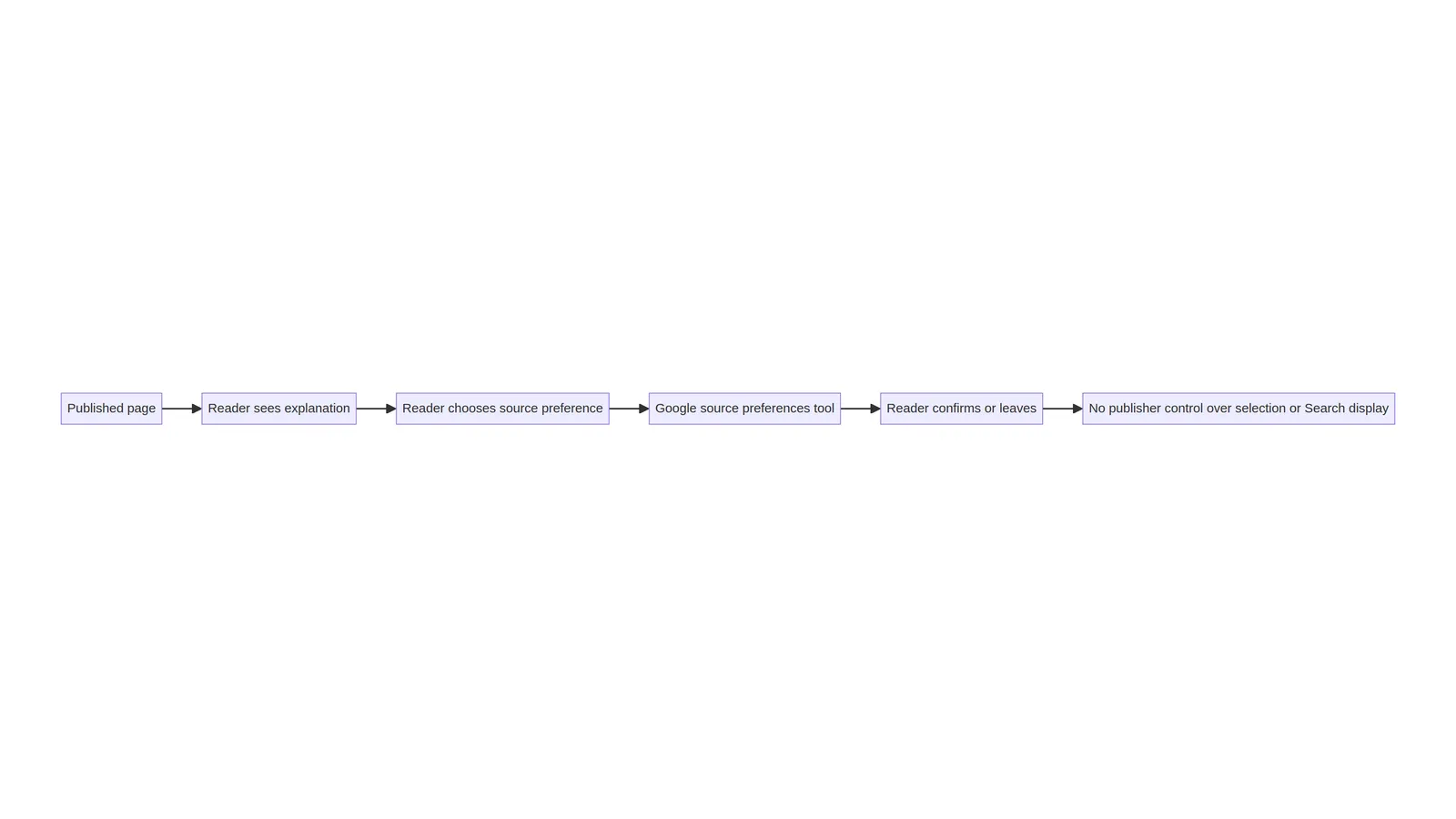
Google’s guidance describes a flow in which a reader selects a publication as a preferred source through Google’s source preferences experience. The site owner can guide a reader to that experience with the standard button, a custom implementation or a deeplink. The owner cannot select a source on the reader’s behalf, and the page copy should never present a click as control over Search appearance.
For editors, the model creates three separate records: the identity of the publication, the explanation shown on the page, and the reader’s action in Google’s interface. Keeping those records separate avoids inflated language and makes support questions easier to answer. If a reader asks why a badge, Top Stories placement or AI feature did not appear, the honest answer is that the page does not control those outcomes.
What Google documents
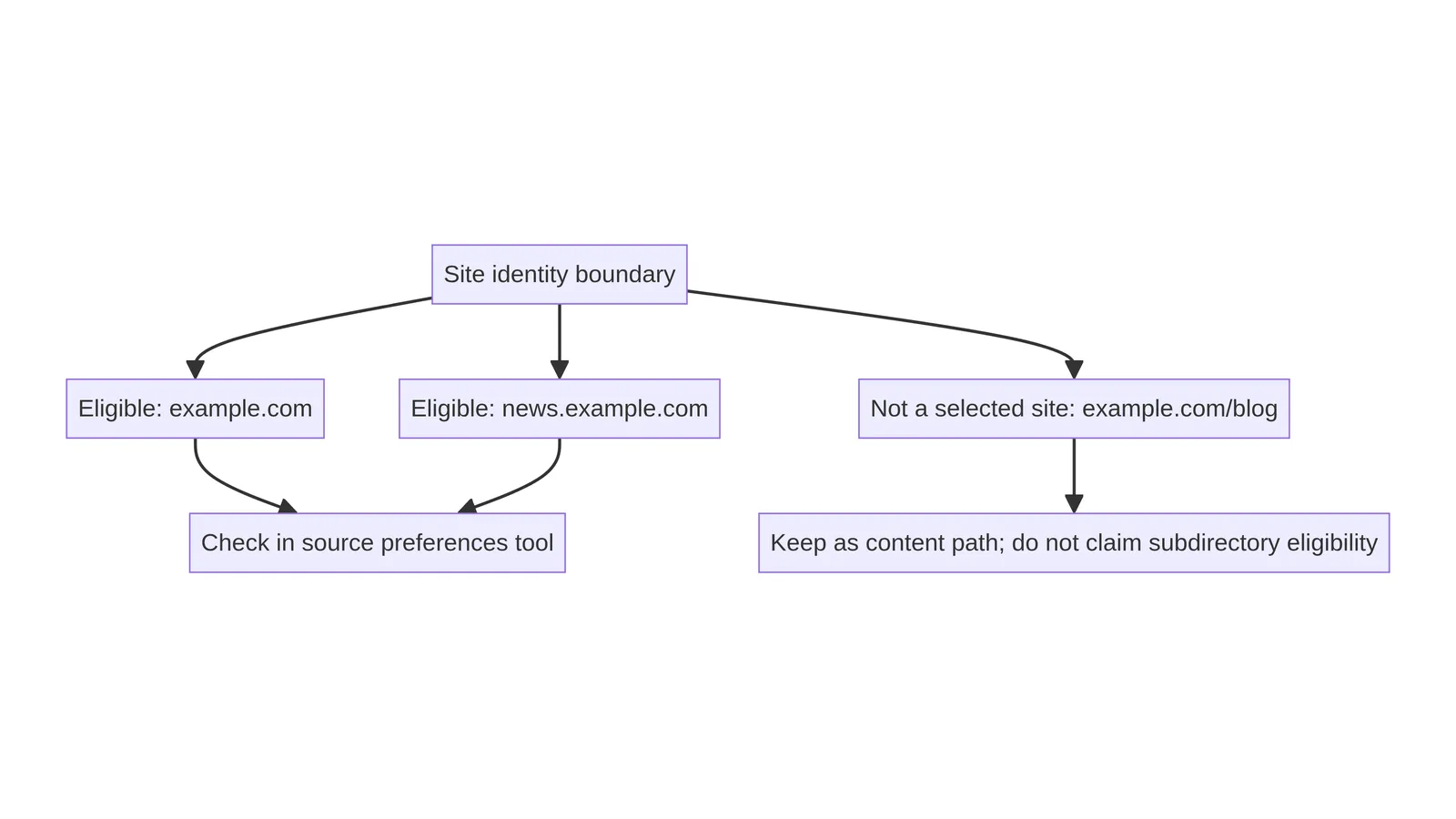
The current Preferred Sources documentation explains that eligible domain-level and subdomain-level sites can appear in the source preferences tool. It gives examples of a root domain and a subdomain, and contrasts them with a subdirectory. It also describes availability across Top Stories and, where those features are available, AI Mode and AI Overviews. Those statements describe feature context, not an entitlement for any individual publisher. [1]
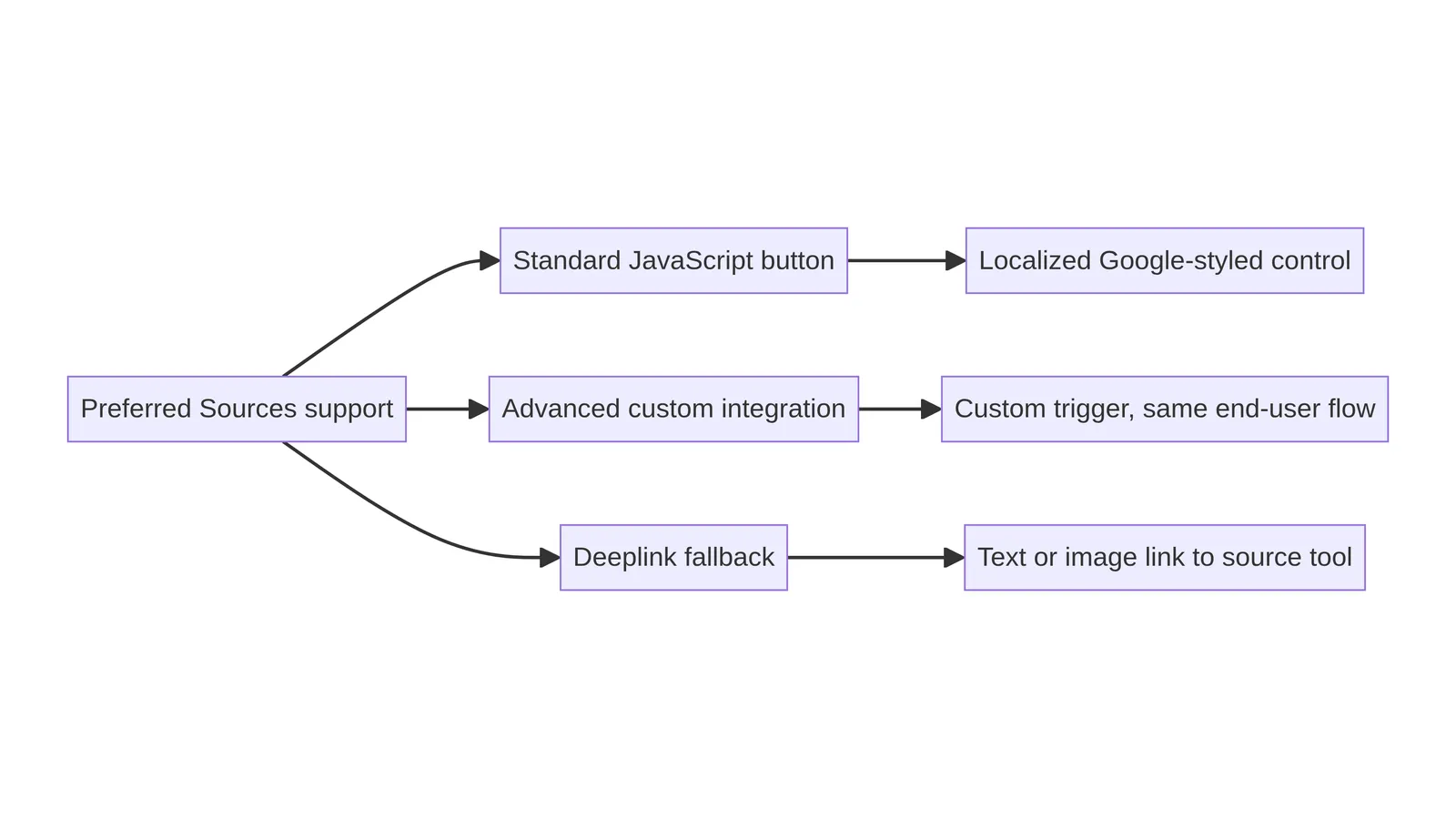
The implementation guidance has a recommended standard JavaScript route, an advanced JavaScript route for custom triggers and design assets, and a deeplink route for environments that cannot use the script. An editorial article should reproduce the documented mechanics carefully while keeping its claims narrower than promotional copy. Google’s documentation update dated August 20, 2026 also identifies a new custom button for Preferred Sources, which makes a current review useful. [2]
Eligibility: domain, subdomain and subdirectory
Eligibility is a boundary question, not a score. Google’s examples treat ‘https://www.example.com/’ and ‘https://code.example.com/’ as site-level candidates, while ‘https://www.example.com/blog’ is a subdirectory rather than a separate selected site. A publisher should check the source preferences tool with the domain or subdomain that represents the publication, then record what was tested and when. The article should not claim eligibility for a site merely because the site has a blog or publishes news-like material.
This distinction also affects migrations. A change from a root domain to a subdomain, or a consolidation of subdomains, changes the identity that a reader may select. A folder move inside the same domain is a content architecture change, not automatically a new source identity. Keep the explanation factual, and ask the technical owner to review canonical URLs, redirects and branding separately when the site structure changes.
The source preferences tool
The source preferences tool is the place to check whether a publication can be found as a preferred source and to let a reader confirm a selection. A site owner can test the tool with the exact domain or subdomain, but the result is a point-in-time observation rather than evidence of future availability. Record the test URL, date, locale and device context in an internal change note.
A good page explains what happens after the link or button is activated. It does not hide the destination, imply that a preference is permanent, or frame the reader’s choice as a required step. A short sentence such as “If Google lists this publication in its source preferences tool, you can choose it there” keeps the instruction conditional and transparent.
The standard JavaScript button
Google recommends a standard JavaScript implementation that loads its Preferred Sources publisher library and renders an interactive button where the ‘google-add-preferred-source-btn’ attribute appears. The documentation also describes optional light or dark themes and an optional language override. A CMS editor should treat the script and container as a paired integration: loading the library without the container creates no useful control, while placing the container without checking the library can create an empty region. [1]
The simplest review checks the delivered page rather than only the editor preview. Confirm that the external script is present when intended, that the target container receives a usable control, that the control has an accessible name, and that the page still explains the action when the script is blocked. Avoid duplicating the same button in the header, article body and footer unless each placement has a clear reader purpose.
Advanced custom integration
The advanced route supports a custom trigger or design while retaining the same end-user flow. Google documents both an ES module form and a standard script callback queue. The implementation choice belongs with the site’s technical owner because it affects loading order, consent handling, bundling, localization and maintenance. An editor should not paste a custom script into many posts merely to improve a plugin score.
A responsible review records the library URL, initialization method, theme, language and trigger selector. It also records what happens if the custom trigger is missing, if the module fails to load, or if a browser blocks third-party code. A custom visual treatment should remain recognizable as an optional source-preference action rather than resembling a required subscription, a download, a payment control or a browser permission prompt.
Deeplink fallback
The deeplink route is useful when a CMS cannot support the JavaScript button or when a publication wants a simple text or image link. Google documents the source preferences URL with a query value containing the website address. A text link is often the most robust fallback because it remains visible to keyboard users, screen readers, constrained browsers and readers who disable script. [1]
Use descriptive link text. “Add this publication as a Preferred Source in Google” explains the destination better than “Click here.” If an image carries the action, give it meaningful alternative text and preserve a nearby text equivalent. Test the encoded destination, the back path, and the behavior when the source is not listed. A failed lookup is a reason for a calm explanatory message, not a reason to claim that Google is malfunctioning.
Placement and editorial wording
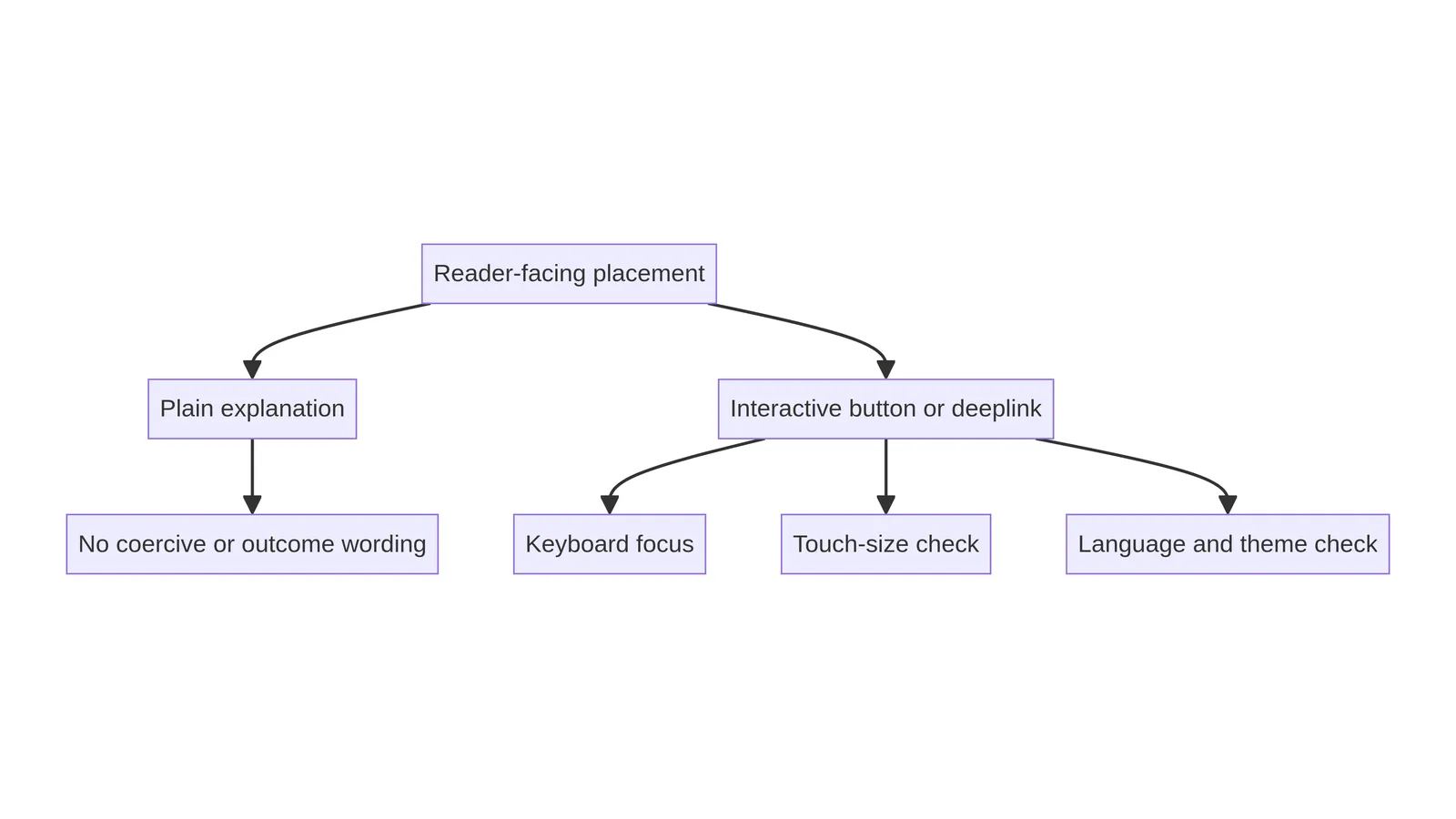
Placement should follow reader context. A publication note near the author or source explanation may suit a news article, while a concise footer note may suit a durable service guide. Avoid placing the control where it interrupts a form, masks a consent choice or competes with the primary navigation. One well-explained instance is easier to understand and maintain than several identical prompts.
The surrounding words should describe agency accurately. “Choose SEOelinks in Google’s source preferences tool if it is available to you” is bounded. “Make our pages appear first” is not. The page can explain why a reader might want a consistent source, such as easier discovery of future articles, but it should avoid promising a particular result. This wording boundary protects the reader from a mistaken expectation and gives support staff language they can repeat consistently.
Language and theme checks
The standard button is designed to support localization, and Google documents a language override through ‘data-lang’. A review should compare the page language, the browser language and any explicit override. An override that forces English on a French or Punjabi page may make the action less clear even when the control functions correctly. Keep the choice deliberate and document why it exists.
Theme selection is a contrast decision as well as a brand decision. Check the light and dark options against the actual background, focus indicator and nearby text. Do not assume that a button that looks correct in a design file remains legible after a theme, cookie banner or responsive breakpoint changes. Capture the tested theme and language in the maintenance record so a future editor can reproduce the check.
Accessibility and touch review
An optional source-preference control still belongs to the page’s interaction system. Keyboard users need a visible focus state and a logical tab position. Screen-reader users need a name that explains the action. Touch users need enough space around the control to activate it without striking an adjacent link. The surrounding paragraph should remain understandable if the control fails to render.
Review at a narrow viewport with text zoom and reduced-motion preferences. A third-party control may inject markup with its own dimensions, so the page wrapper should not clip it or create horizontal overflow. If the control is represented by a custom image link, test the image’s intrinsic size, alt text and focus outline. Do not hide the only explanation inside a hover state or animation.
Privacy and external-script review
The standard JavaScript route loads a Google-hosted publisher library. A site owner should review the project’s privacy and consent requirements before adding that script, particularly when the site has a consent-management process that controls third-party resources. The article can explain the review questions without asserting a legal conclusion for every jurisdiction.
Document the script source, the reason for loading it, the page locations where it appears, and the owner responsible for checking it. Check the network request in a clean session, then check the consent-denied path. If the project does not want an external script, a deeplink can provide a narrower alternative. The important choice is an explicit one, rather than an unexplained snippet copied into a template.
CMS and component decisions
Some CMSs permit a script in the site head and a container in post content; others strip scripts from editorial fields. Treat that limitation as an architecture decision. A reusable template component may provide consistent placement, while a deeplink may be safer for a one-off article. Neither route changes the need for a visible explanation, accessible naming and a fallback.
Keep the article’s editorial content independent from the integration. If a component is removed, the article should still make sense. If a domain changes, the component owner should be able to update the source identity in one place. Avoid copying the same JavaScript block into dozens of posts, because duplicated code increases the chance of stale URLs, inconsistent language settings and forgotten removal work.
No-script and failure paths
A useful failure path is visible, calm and specific. If JavaScript is unavailable, provide a text deeplink or a sentence that explains how the reader can search for the source preferences tool. If the page is not listed, say that the documented action depends on Google listing the site. If the external library times out, preserve the surrounding explanation and avoid replacing it with a blank gap.
Test the page with script blocking, a slow connection and a browser that does not support the chosen module path. Check whether an error message is announced, whether layout shifts move the reader’s focus, and whether the primary article remains usable. Failure testing is not a claim about Search behavior; it is ordinary quality control for a reader-facing optional control.
Troubleshooting duplicate or empty controls
Duplicate controls usually originate from more than one template layer: a global footer, an article component, a plugin block or an editor-pasted container. Inspect the delivered DOM and the template sources before removing anything. A single clear control is generally easier to label, focus and maintain than several competing copies.
An empty container can indicate a script-loading problem, a consent gate, a malformed attribute or a selector mismatch. Record the actual DOM, console and network evidence, then test the smallest repair in a controlled environment. Do not respond by adding another copy of the script or by hiding the empty region with CSS. The fix should restore a clear reader path or remove the unused integration.
A comparison for choosing a route
The route decision should follow the site’s capabilities and reader needs. The standard button is a good default when the site can load the documented library and wants Google’s localized control. The advanced route suits a technical team that needs a custom trigger and can own its code. The deeplink suits a CMS with limited script support or a publication that prefers a simple, durable link.
| Route | Best fit | Review focus |
|---|---|---|
| Standard JavaScript button | CMS can load Google’s documented library | Localized control, delivered DOM and fallback |
| Advanced custom integration | Technical owner needs a custom trigger | Initialization, consent, focus and maintenance |
| Deeplink | Script-limited or simple editorial environments | Encoded destination, text equivalent and no-script use |
| Record | Example evidence |
|---|---|
| Identity | Exact domain or subdomain checked in the source preferences tool |
| Experience | One named control, keyboard focus, touch spacing and readable explanation |
| Ownership | Implementation owner, review date and removal trigger |
Maintenance record and ownership
Every integration needs an owner, a review date and a removal trigger. Record the exact publication identity, source URL, implementation route, theme, language, page locations, fallback text, consent decision and last successful test. Add a note for domain or subdomain migrations because the selected source identity depends on the site boundary documented by Google.
A maintenance check should revisit the official documentation, the delivered DOM, the source preferences tool, the link destination, keyboard behavior, touch spacing and the no-script path. Check whether the component still explains a reader-controlled action. If the feature, library or publication identity changes, update or remove the control rather than leaving a misleading relic in old articles.
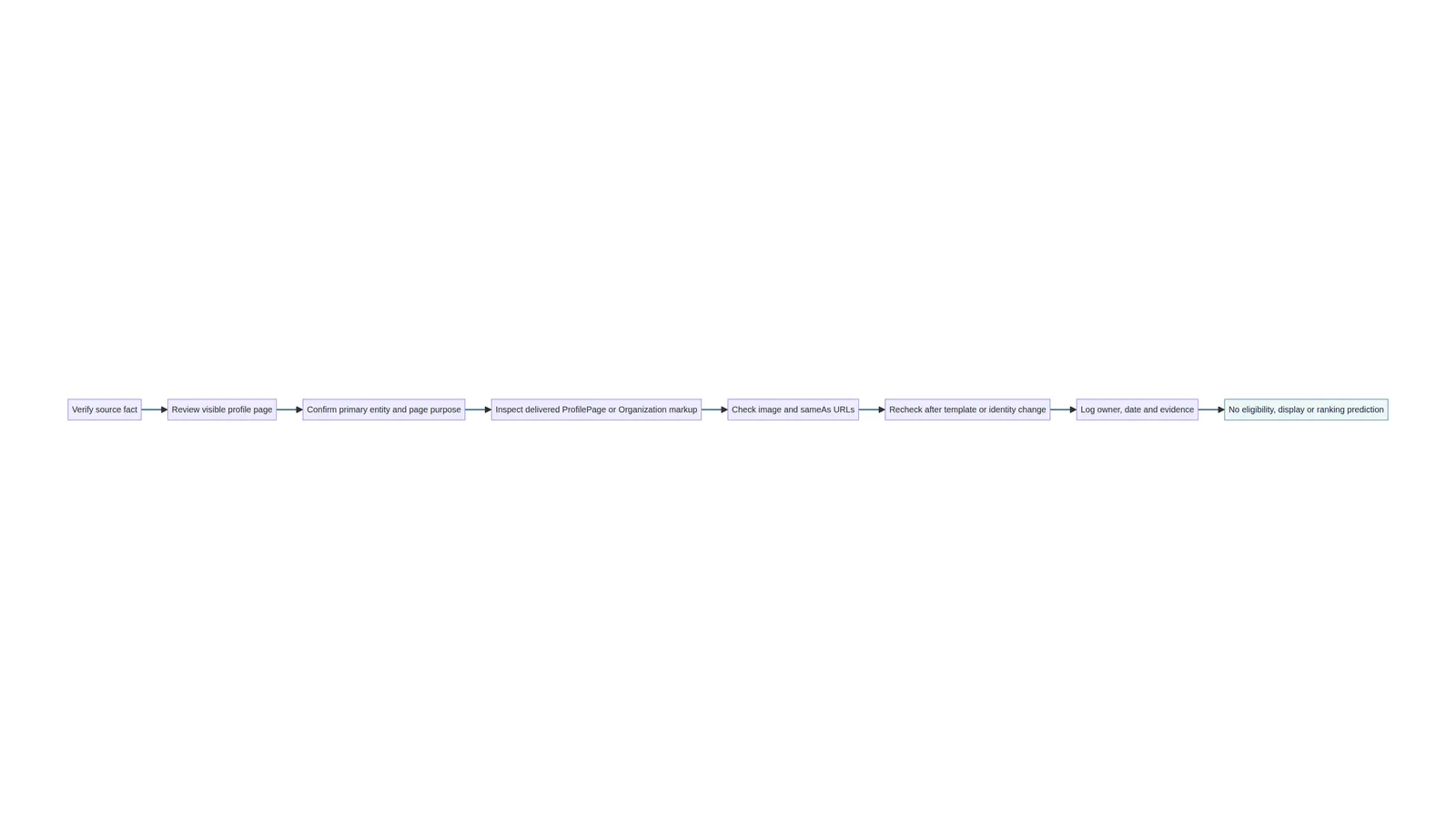
A practical evidence checklist
Before an editor approves the control, ask: Is the exact domain or subdomain identified? Was eligibility checked in the source preferences tool? Is the page copy conditional and reader-centered? Is the implementation route documented? Does the delivered page contain one understandable control rather than an empty or duplicated region?
Then check the experience: keyboard focus is visible, the control is usable at 390 pixels, the language and theme are intentional, reduced motion does not remove meaning, the deeplink is valid, the no-script path remains useful, and the external script has a recorded owner. These checks verify the page’s quality. They do not predict whether Google displays a badge, a Top Stories result, an AI feature or any other Search treatment.
What this guide does not promise
Preferred Sources is a reader-controlled preference mechanism. This guide does not promise rankings, traffic, indexing, crawling, citations, Top Stories inclusion, AI Mode inclusion, AI Overview inclusion, badge display or any other Search outcome. It does not claim that a button forces Google to list a publication, and it does not claim that SEOelinks is currently eligible without a direct check.
The durable recommendation is narrower: explain the option truthfully, use a documented route when appropriate, preserve an accessible fallback, and keep an owner responsible for the integration. Search systems and interfaces can change. A careful publisher maintains the page as a useful reader experience rather than presenting an optional control as a lever over Google’s decisions.
References
[1] Google Search Central: Help your readers find your site through preferred sources in Google Search.
[2] Google Search Central: Latest documentation updates, including the August 20, 2026 custom-button update.